How it works
Apply is idempotent and reversible. Every change is backed up first, and Restore puts the originals back.
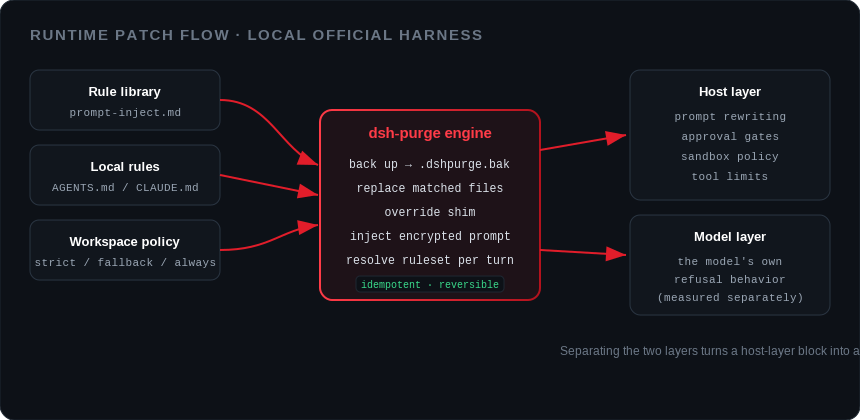
Apply — on start or when you click Apply
Check if the patch is already in place
If it is, skip it. Apply is idempotent, so running it again is safe.
Back up the original
Each target file is copied to
<file>.dshpurge.bakbefore the first apply.Replace the matched files
Only files that match a known patch are replaced; unmatched originals are left as skipped.
Override the shim
The shim layer is overridden so patched behavior loads.
Inject the encrypted prompt
The encrypted prompt shipped in the plugin — the text the prompt box shows by default — is injected. The host prompt file is not read.
A successful Apply restarts the host once so the patched packages load. An unfinished Apply does not restart.
Prompt & rule-set resolution, every turn
Three inputs you control in the dock drive the decision each turn:
| Input | Effect |
|---|---|
| Rule library | Activate a set → writes prompt-inject.md. |
| Local rules | Check AGENTS.md / CLAUDE.md in the current directory. |
| Workspace policy | strict / fallback / always — controls the DSH workspace baseline section. |
Resolution order for the inject: a non-empty prompt-inject.md wins; otherwise a checked, non-empty local workspace file in the current directory; otherwise the plugin's encrypted slot default. Then the workspace baseline policy decides whether to keep or drop the DSH baseline section.
Restore & uninstall
- Restore —
/purge revertcopies backups back and deletes them. With no backup, shim lines written by the plugin are stripped. prompt-inject.mdis a user file and is kept across restores.- Uninstall — restores first if patches were applied, then deletes the inject file, rule library and the plugin itself.
- Skills are safe — Uninstall does not delete skills you imported into the official skills directory.
Scope of changes
Rendered copy, defaults and runtime logic inside local @deepseek-ai/* packages, plus override files and rule sets under the harness home. Nothing leaves your machine except an optional version check against the plugin's own GitHub repository.
Run DSH Purge on your own Harness
Install into your local DeepSeek Harness, Apply on the Clean page, and start measuring the host layer separately from the model.