DSH Purge — see what the harness does, not just what the model says
DSH Purge (dsh-purge) is a red-team plugin for the official DeepSeek Harness running on your own machine. A harness does plenty before the model ever sees your prompt: it rewrites prompts, gates approvals, sandboxes tools. DSH Purge peels that host layer back, so when something gets blocked you can tell whether the policy did it or the model did.
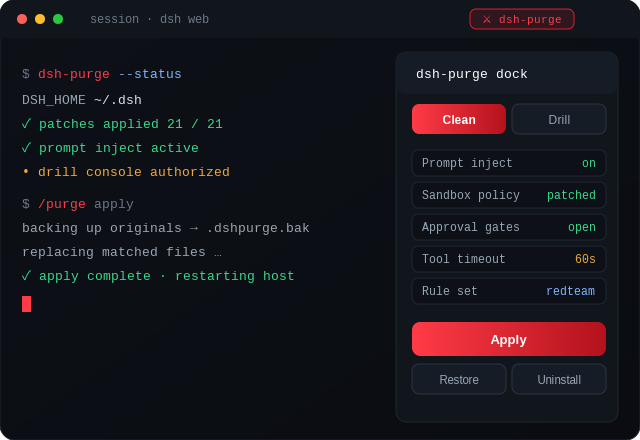
Local · authorized · reversible · host-layer only
Two layers, separated
A harness does more than forward your prompt. DSH Purge isolates host-layer policy from the model, so you can see whether a block came from the policy or from the model itself.
Clean page
Grouped patch status with Apply, Restore and Uninstall, a prompt editor, and multiple rule sets — all from a dock beside the session title.
Drill console
After an authorization gate: assets, skills and local environment for an exercise you are entitled to run — never public or third-party targets.
Fully reversible
Every target is backed up to .dshpurge.bak. Restore copies originals back; Uninstall reverts and removes the plugin.
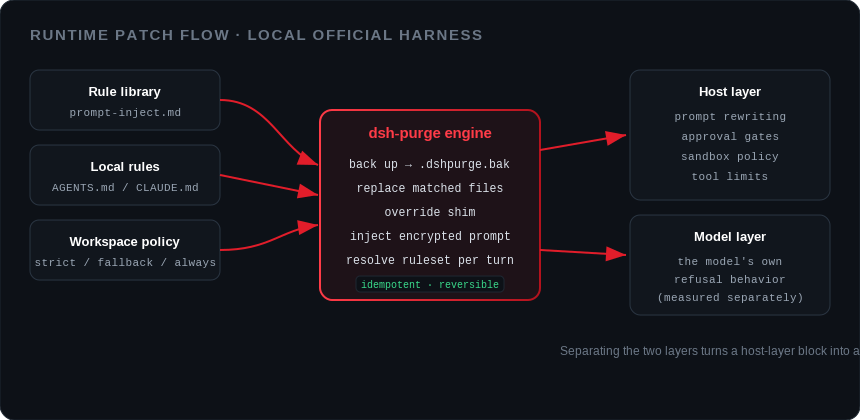
A host-layer block is not a model refusal
Ask only "will the model answer?" and you end up blaming the model for calls the harness made. The DeepSeek Harness makes a lot of them at runtime: rewriting prompts, gating approvals, enforcing a sandbox, migrating sessions, all of it wrapped around the model.
DSH Purge touches only the local official @deepseek-ai packages on your machine, so you can look at each layer on its own terms — which default policy is too strict, where a refusal really starts, and how the harness holds up during a red-team exercise you're authorized to run.
- Patches only local official Harness packages and local config
- No public scanner, no attack kit for third-party sites
- Keeps official capabilities — no second invented identity
⚠ Authorized, local use only
DSH Purge is for red-team research and robustness evaluation on an official Harness you are entitled to administer. Do not run it against targets without the owner's lawful written authorization, against public online systems, or against production workloads. See the responsible-use policy.
Everything about dsh purge
From what the DeepSeek Harness is, to installing the plugin, to running an authorized drill.
DeepSeek Harness
What the harness is and the runtime layers DSH Purge works with.
Read →Features
The dock, Clean and Drill pages, rule sets, prompt inject and skills.
Read →Install
Web and desktop profiles, Apply steps, and manual installation.
Read →Usage & CLI
dsh-purge flags and the /purge, /rules, /skills commands.
Red team testing
The controlled evaluation use case and the authorization gate.
Read →Responsible use
Scope, legal disclaimer and the forbidden-use boundaries.
Read →See the harness for what it is
Install DSH Purge on the Harness you administer, Apply on the Clean page, and start telling the two layers apart.